Short answer
Usually yes, if two things are true: your site doesn't block OpenAI's search crawler in robots.txt, and your key details (services, prices, hours, location, FAQs) are written as real text in the page HTML. OpenAI says "Any public website can appear in ChatGPT search." But a 2024 Vercel study found major AI crawlers don't run JavaScript, so text that only appears after scripts load, or that sits inside an image, may be missed.
Quotable definition: A website is AI-readable when the facts a customer asks about (what you do, what it costs, where you are, when you're open) appear as plain text in the page's HTML, on pages that AI search crawlers are allowed to visit.
How does ChatGPT find and read a business website?
OpenAI runs separate crawlers for separate jobs. Its documentation says "OAI-SearchBot is used to surface websites in search results in ChatGPT's search features," while "GPTBot is used to make our generative AI foundation models more useful and safe" (it crawls content that may be used for training). OpenAI notes "Each setting is independent of the others," so you can allow search and block training.
The one that matters for being recommended is OAI-SearchBot. OpenAI is direct about it: "Sites that are opted out of OAI-SearchBot will not be shown in ChatGPT search answers, though can still appear as navigational links." After a robots.txt change, OpenAI says it "can take ~24 hours" for search to adjust.
Why can Google see my site but an AI tool can't?
Google renders pages: its documentation says "a headless Chromium renders the page and executes the JavaScript." AI crawlers have been different. Vercel's December 2024 analysis of crawler traffic found "none of the major AI crawlers currently render JavaScript," including OpenAI's and Anthropic's. ChatGPT's crawler fetched JavaScript files (11.50% of its requests) but didn't execute them. Vercel's advice: "ChatGPT and Claude don't execute JavaScript, so any important content should be server-rendered." Crawler behavior can change, so treat this as a reason to put key facts in plain HTML, not as a permanent rule.
The same logic applies to text inside images. A treatment menu uploaded as a photo, a price list in a scanned PDF, or hours shown only in a graphic aren't text in the page. Some tools may read them; you shouldn't count on it.
What did this look like for a real small business?
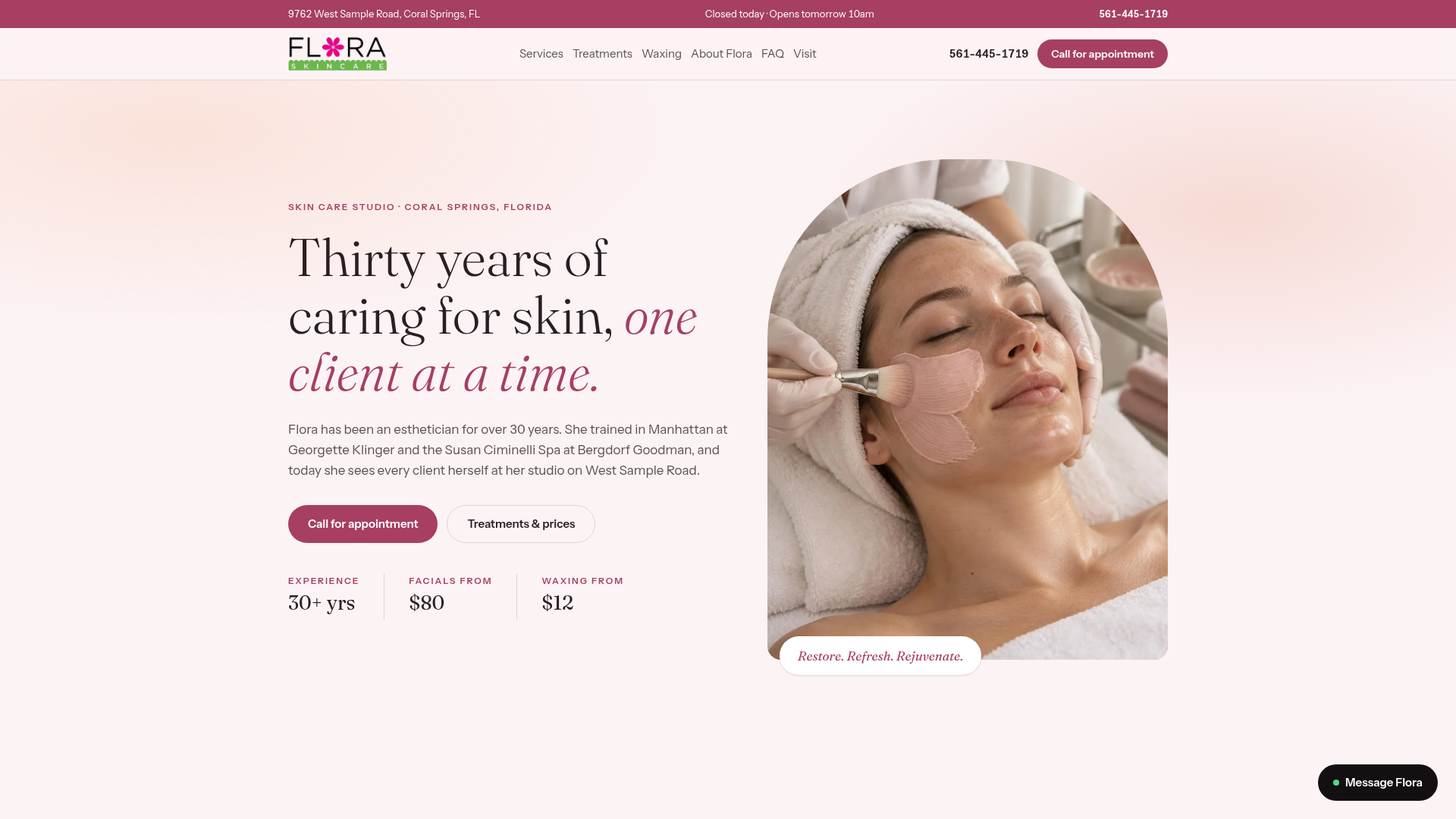
Skincare by Flora is a skincare studio in Coral Springs, Florida. Her clients come back for her expertise, but her old website, in the words of our case study, "was out of date, hard to read, and didn't make a first-time visitor feel confident booking."
When HUNTR rebuilt it, we focused on what both a nervous first-time client and a search crawler need:
- A clear treatment menu, with services organized by category.
- Pricing, hours and contact up front, so there's no hunting for the basics.
- A mobile-first layout with clean typography and sticky navigation.
- An FAQ section that answers common questions before clients call.
- Text-based page content: all business information and FAQs live in the page HTML "so Google and AI search can read it."
The result, per the case study: visitors "can see services, pricing and hours in seconds," and the studio's Coral Springs location, hours and contact details are easy to find. The same text that helps a person decide to book is the text an AI tool can quote when someone asks for a facial near Coral Springs.
The 5-Minute AI Readability Check
You can run this yourself on a laptop. No tools to buy.
- Open your own robots.txt file. Type your domain followed by /robots.txt, for example gohuntr.com/robots.txt. Look for "OAI-SearchBot". If you see it followed by "Disallow: /", ChatGPT search is blocked. No mention at all usually means it's allowed by default, unless a "User-agent: *" section disallows everything.
- View the page source (right-click, "View page source," or Ctrl+U / Cmd+Option+U). Press Ctrl+F and search for your phone number, one price and your opening hours. That raw HTML is close to what a crawler that doesn't run JavaScript receives. If they're not there, an AI crawler probably can't see them.
- Look for text in pictures. Is your menu, price list or hours an image or PDF? Add the same information as text on the page.
- Check your FAQ. Are the five questions customers ask most on the page, in plain sentences?
- Check your analytics for ChatGPT visits. OpenAI says "ChatGPT automatically includes the UTM parameter utm_source=chatgpt.com in referral URLs," so those visits show up by name in most analytics tools.
Before and after: what an AI tool can and can't use
| Business detail |
Hard for AI to use |
Easy for AI to use |
| Services |
Menu uploaded as a photo or PDF |
Treatment menu as text, grouped by category |
| Prices |
"Call for pricing" or a price graphic |
Prices (or "from" prices) written on the page |
| Hours and location |
Only in a map widget or footer image |
Address, city and hours as text near the top |
| Common questions |
Answered only on the phone |
FAQ section in plain sentences |
| Crawler access |
robots.txt blocks OAI-SearchBot |
OAI-SearchBot allowed |
AI-Readable Website Checklist (8 points)
- robots.txt doesn't disallow OAI-SearchBot
- Business name, city and phone appear as text on the homepage
- Every service has a short text description
- Prices or starting prices are written as text, if you share them
- Hours appear as text, not only in an image or widget
- An FAQ answers your top five customer questions
- Key text is in the page source (Ctrl+U), not only after scripts run
- Analytics can show visits tagged utm_source=chatgpt.com
How does HUNTR handle this?
For Flora, we put the business details and FAQs on the page as real text. The website build is free, and plans start at $99/month with a 12-month minimum term; see pricing. A new site is typically live 2 to 4 weeks from the strategy call. If you want ongoing work on showing up in AI answers, see our AEO service, or read how we approach websites for med spas and skincare studios. Not sure where your site stands? Start with the free Digital DNA Test.
Sources